Gillia
Try Gillia Capabilities Point of sale Inventory Online store Bookings CRM & loyalty Quotes & invoicing Use cases Use cases Pricing About What's new
What's new in Gillia, November 2026

What's new in Gillia November 2026

This month, Gillia answers your phone and gives you your own address online. Your store carries your domain name, your emails go out from your address, and supplier invoices arrive in Gillia on their own. On the AI side, the Claude and ChatGPT connector does more, and banking arrives in beta.

November’s updates are waiting for you in your Gillia account.

Log in
1

AI phone assistant

Never miss a call again: your AI advisor now answers the phone too.

Gillia picks up when you’re busy

When nobody at the store can answer, your advisor picks up for you: it answers customers’ questions, takes bookings, pickup orders and messages, and leaves you a summary of every call. It handles up to 5 calls at once: orders go straight to your register, and bookings land in your schedule. Numbers are available in France, the United States, Spain and England.

  1. The customer calls your usual number.
  2. Nobody at the store picks up: your advisor answers.
  3. You find the booking, the order or the message, with a summary of the call.

Where to find itCustomer service › AI advisor, “Phone” tab.
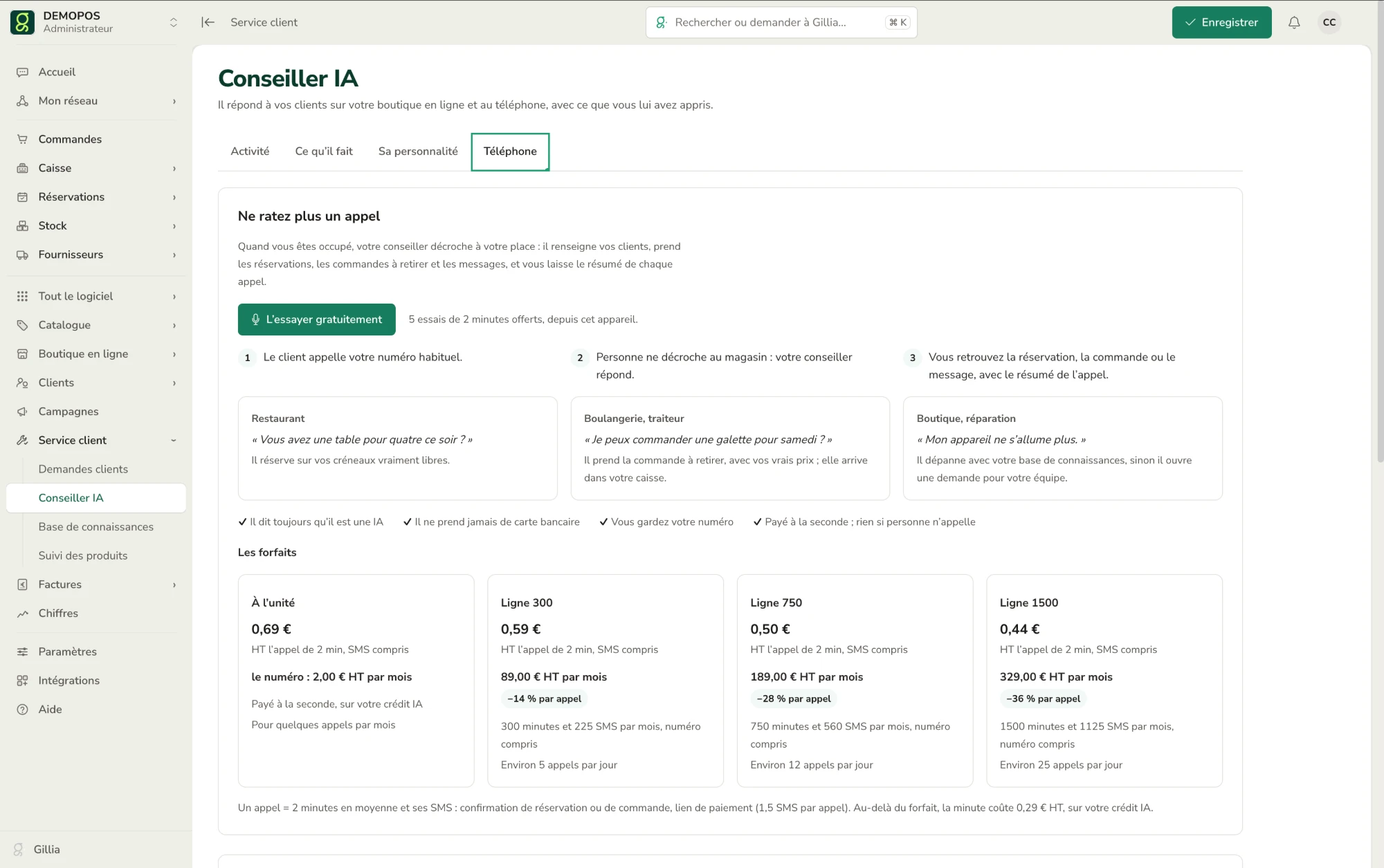
The Phone tab of the AI advisor in Gillia: how it works in three steps, sample calls for a restaurant, a bakery and a shop, and the four plans

Restaurant

“Do you have a table for four tonight?”

It books only the time slots you actually have free.

Bakery, caterer

“Can I order a king cake for Saturday?”

It takes the pickup order at your real prices, and the order lands on your register.

Shop, repairs

“My device won’t turn on anymore.”

It troubleshoots with your knowledge base, or opens a request for your team.

Callers recognized by their number

The caller is matched to their customer record, with their history.

No card numbers over the phone

It never takes a card number. The customer gets a text confirming their booking or order, with a secure link to pay or to leave a card guarantee for their booking.

It always says it’s an AI

Your customers know who they’re talking to.

When a person is needed

Enter the number to transfer calls to: a customer who asks for a person is put through to you.

Keep your number

Your customers keep calling the number they know: call forwarding or your VoIP system is all it takes.

Hear it answer

Talk to your advisor from your computer, just like a customer on the phone. It answers with your knowledge base, your opening hours and your catalog. Your first 5 two-minute tries are free.

The same advisor, online and on the phone

Your AI advisor answers customers on your online store and on the phone, using what you’ve taught it.

Plans

Billed by the second, and nothing if nobody calls: a call your advisor doesn’t answer costs nothing.

Pay as you go

€0.69 excl. VAT per 2-minute call, texts included.

Phone number: €2.00/month excl. VAT.

Billed by the second, from your AI credit. For a few calls a month.

Line 300

€0.59 excl. VAT per 2-minute call, texts included.

€89.00/month excl. VAT, or 14% less per call.

300 minutes and 225 texts a month, number included. About 5 calls a day.

Line 750

€0.50 excl. VAT per 2-minute call, texts included.

€189.00/month excl. VAT, or 28% less per call.

750 minutes and 560 texts a month, number included. About 12 calls a day.

Line 1500

€0.44 excl. VAT per 2-minute call, texts included.

€329.00/month excl. VAT, or 36% less per call.

1,500 minutes and 1,125 texts a month, number included. About 25 calls a day.

One call = 2 minutes on average plus its texts (booking or order confirmation, payment link: 1.5 texts per call). Beyond your plan, minutes cost €0.29 excl. VAT, billed by the second from your AI credit.

2

Your domain name and your mailbox

Your store and your emails, under your own name.

Your domain name

Connect yours or buy one in a few clicks. Your online store finally carries your name: customers find it at www.your-store.com instead of a gillia.app address.

Buy the domain mystore.com
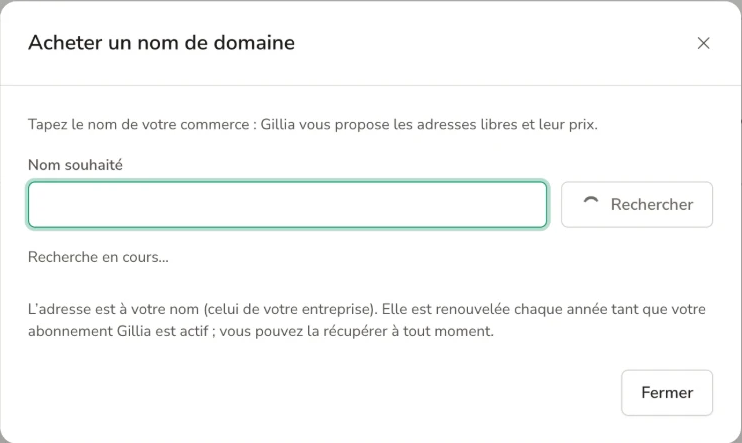
  • Don’t have one yet: type your business name, and Gillia shows you the available addresses and their prices.
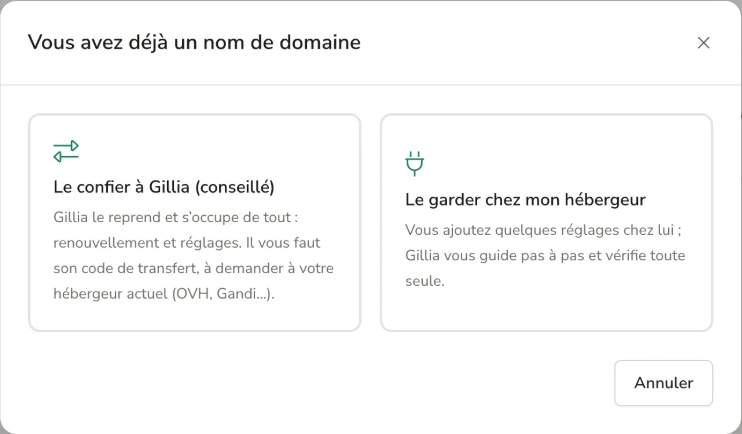
  • Already have one? Transfer it to Gillia (recommended): Gillia takes it over and handles everything, from renewals to settings. All you need is its transfer code, which you request from your current registrar (OVH, Gandi…).
  • Prefer to keep it with your registrar: you add a few settings on their side; Gillia walks you through it step by step and checks everything on its own.

Where to find itSettings › Domain name.
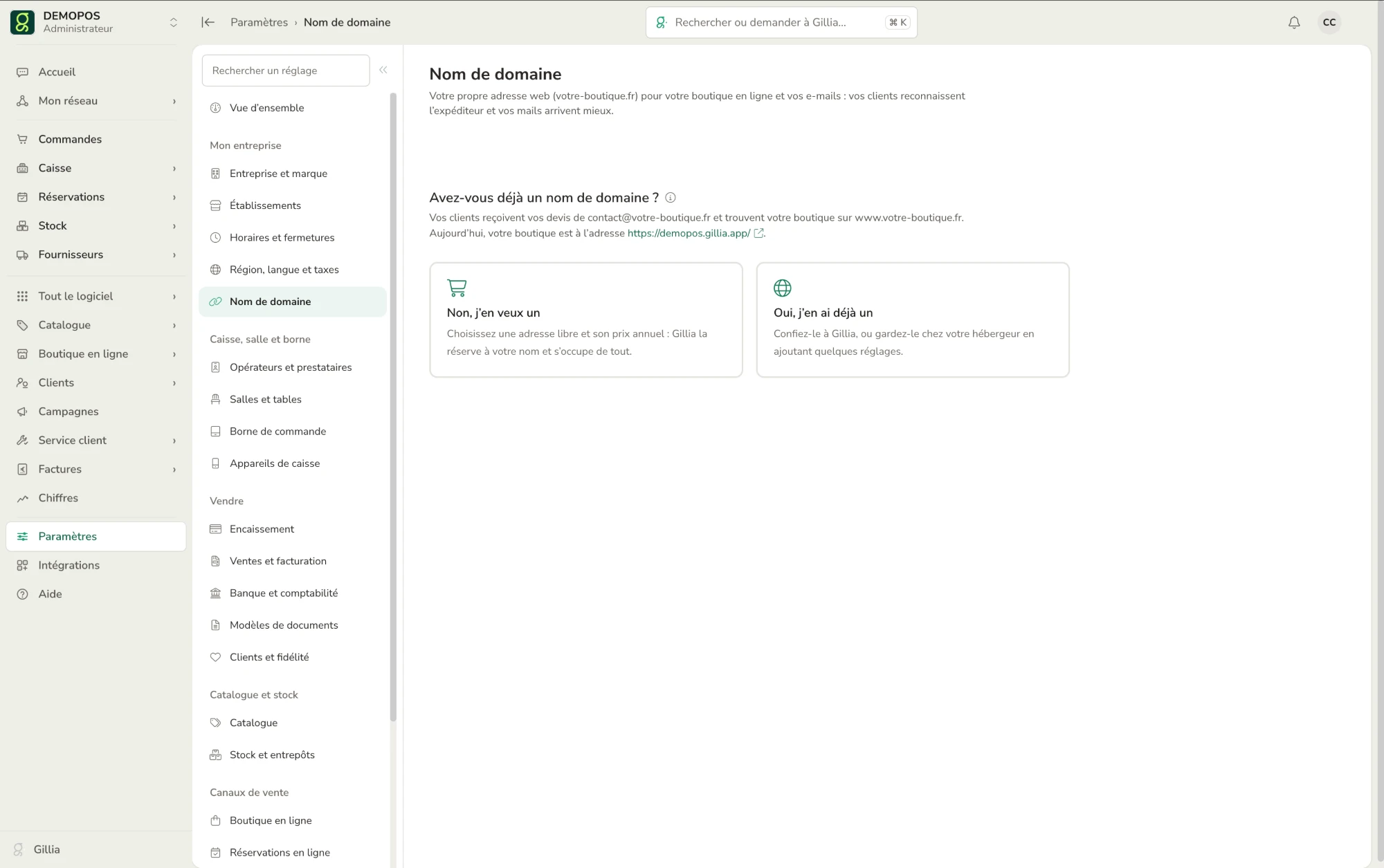
The Settings › Domain name screen in Gillia: “Do you already have a domain name?”, with the options “No, I want one” and “Yes, I already have one”
The “You already have a domain name” window: transfer it to Gillia (recommended) or keep it with your registrarThe “Buy a domain name” window: the “Desired name” field and the Search button

An address in your name

The domain is registered in your company’s name. It renews every year as long as your Gillia subscription is active, and you can take it back at any time.

Emails from your own domain

Your quotes go out from contact@your-store.com: customers recognize the sender, and your emails get delivered more reliably.

Your mailbox

Connect it or create a new one. Quotes, invoices and delivery notes go out from your address, and replies come straight back to you.

Send this quote from my address

In Settings › Email, you choose who appears as the sender of your quotes, invoices and delivery notes, and where customer replies go. Add a sending address in a few clicks:

  • Google: Gmail or Google Workspace.
  • Microsoft: Outlook, Hotmail or Microsoft 365.
  • Other email provider: Orange, Free, SFR, OVH, IONOS, iCloud…, using your email address and password.
  • Your domain name: the address contact@your-store.com is created automatically, and you can create a new one. Sent by Gillia, it’s the most reliable option. You set it up in Settings › Domain name.

Where to find itSettings › Email, “Sending addresses” section.
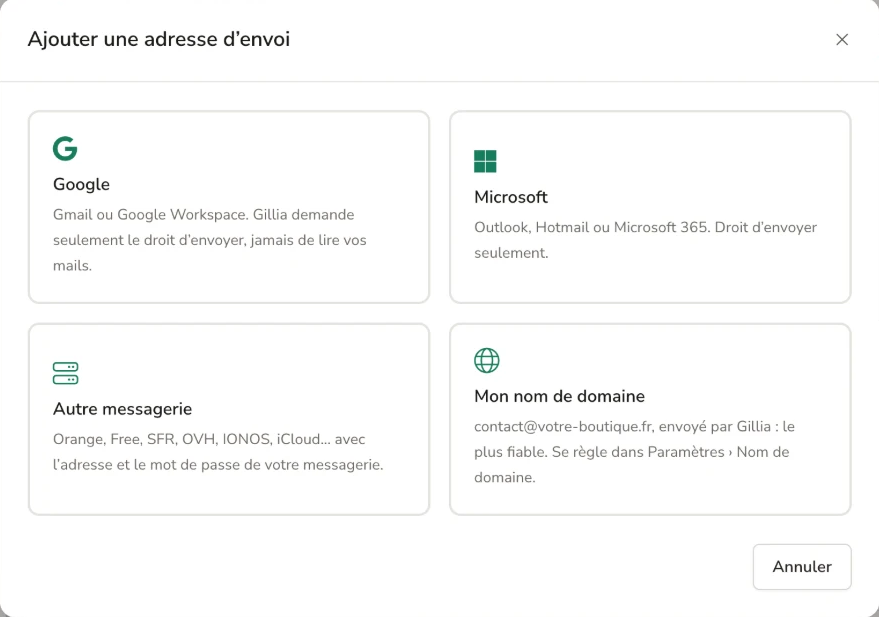
The “Add a sending address” window in Gillia: Google, Microsoft, Other email provider and My domain name

Send, never read

With Google or Microsoft, Gillia only asks for permission to send, never to read your emails.

No mailbox? Gillia sends on your behalf

Without a connected mailbox, Gillia sends your documents under your business name, and replies go to your contact address.

Test before you start

The “Send me a test” button shows you exactly what your customers receive.

3

Supplier invoices and banking

Less data entry, and bank accounts matched to your sales.

Supplier invoices received by email

Each location has its own email address for invoices. Give it to your suppliers, or automatically forward the invoices you already receive. Every invoice that comes in goes to your accounting without a single line typed by hand.

  • Gmail or Outlook: a filter or a rule forwards emails that contain an invoice. A “How to (2 min)” guide walks you through it.
  • Gillia reads every attachment: it creates the invoice with its PDF and finds the supplier by company registration number, email or name (or creates it).
  • You stay in control: the invoice arrives as “To review.” You correct it if needed, then click “Save and approve.” It only goes to your accounting once approved.
  • Supplier credit notes: a credit note received by email is read too, and linked to its original invoice when the invoice number appears on it.
Which invoices have come in?

Where to find itSettings › Email, “Supplier invoices by email” section, or the “My invoice address” link in Suppliers › Supplier invoices.
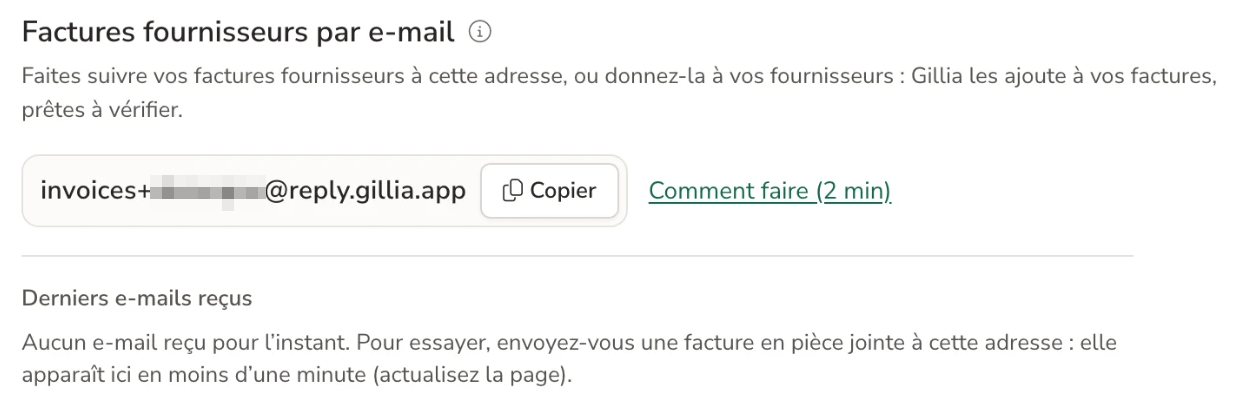
The “Supplier invoices by email” section in Gillia: the dedicated invoice address, the Copy button and the “How to (2 min)” link

Nothing gets lost

An email that was set aside (not an invoice, already received, unreadable, invoice to download from the supplier’s website) stays visible in “Received emails,” with the reason. If it really is an invoice, one click on “Recover as invoice” is all it takes.

Good to know

Attachments in PDF, JPG, PNG or WebP, up to 10 per email. A password-protected PDF can’t be read.

Banking (beta): your accounts matched to your sales

Bank connection links your accounts to Gillia through Bridge, which works with more than 80 banks. Transactions come in every day with no data entry, and the AI matches them to your sales and invoices: card payments from each end-of-day close, meal vouchers, cash and check deposits, customer and supplier invoices.

Match my transactions

Gillia suggests each match with an explanation and a confidence score. Nothing is confirmed without you.

Banking is in beta. To join, just email us.

Join the banking beta

Or write “Bank” to contact@gillia.ai.

Where to find itInvoices › Bank. Once enrolled in the beta, the account owner turns on bank connection in Settings › Gillia subscription.
What’s missing from your account

Gillia spots what should have come in and hasn’t: card payments, meal vouchers, cash deposits, overdue invoices. A delay isn’t a loss: it tells you what to check.

What card payments really cost you

Fees on card payments, meal vouchers and online payments, month by month, with the actual rate.

The AI reviews what’s left

For transactions Gillia couldn’t match on its own, the AI suggests what each one pays for, with its reasons. When it’s missing information, it asks you.

Rent, phone, utilities

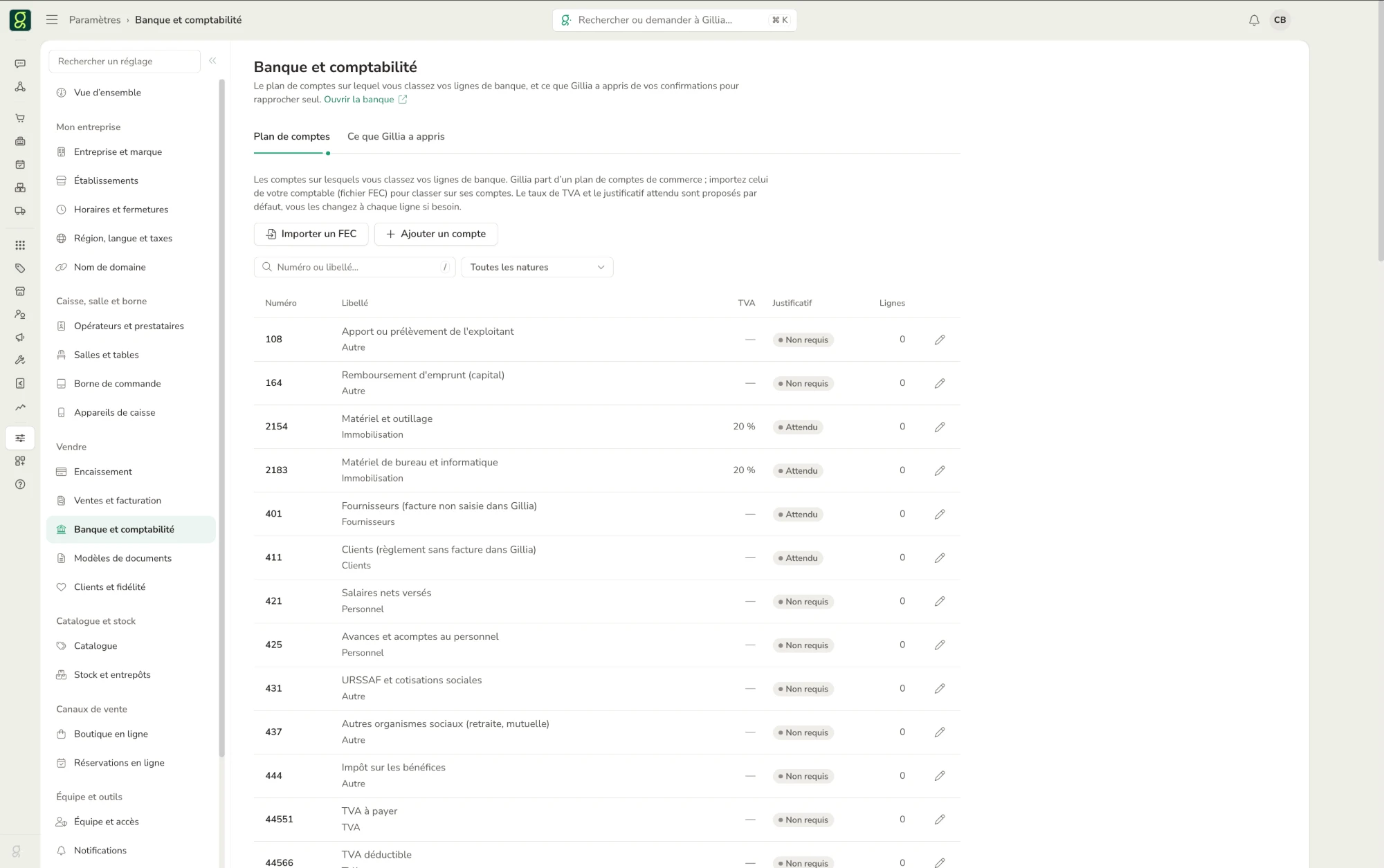
A transaction that doesn’t match any invoice is categorized using a retail chart of accounts, or your own, imported as an FEC file. The VAT rate and the expected receipt are suggested by default.

Gillia learns from your confirmations

Every match you confirm helps it match on its own next time. You can see what it has learned in Settings › Bank and accounting.

Month-end close

Gillia shows the transactions with no entry and the missing receipts, then you lock the period and export the bank journal.

€9/month excl. VAT

Bank connection is an add-on at €9/month excl. VAT for your business, whatever the number of accounts, billed with your Gillia subscription paid by card.

The Settings › Bank and accounting screen in Gillia: the chart of accounts used to categorize bank transactions, with the VAT rate and expected receipt for each account, and the Import an FEC and Add an account buttons
4

Claude and ChatGPT

The Gillia connector does more

In Claude or ChatGPT, the Gillia connector now does more: you create and edit your online store, email campaigns, quotes and invoices in a single sentence.

Gillia exposes your operations as tools that Claude or ChatGPT can call. The assistant reads your numbers, prepares a change and shows it to you: the same safeguards as in Gillia decide whether it goes through.

Prepare the Christmas campaign

Connect it in three steps:

  1. In Gillia, copy the connector address.
  2. In Claude or ChatGPT, add a connector with that address.
  3. Sign in with your Gillia account, with no key to copy.

You need a Claude or ChatGPT account that can add a connector (MCP), and you must be an administrator of the business.

Where to find itSettings › Integrations, “AI & assistants” category, “Claude & ChatGPT” app.
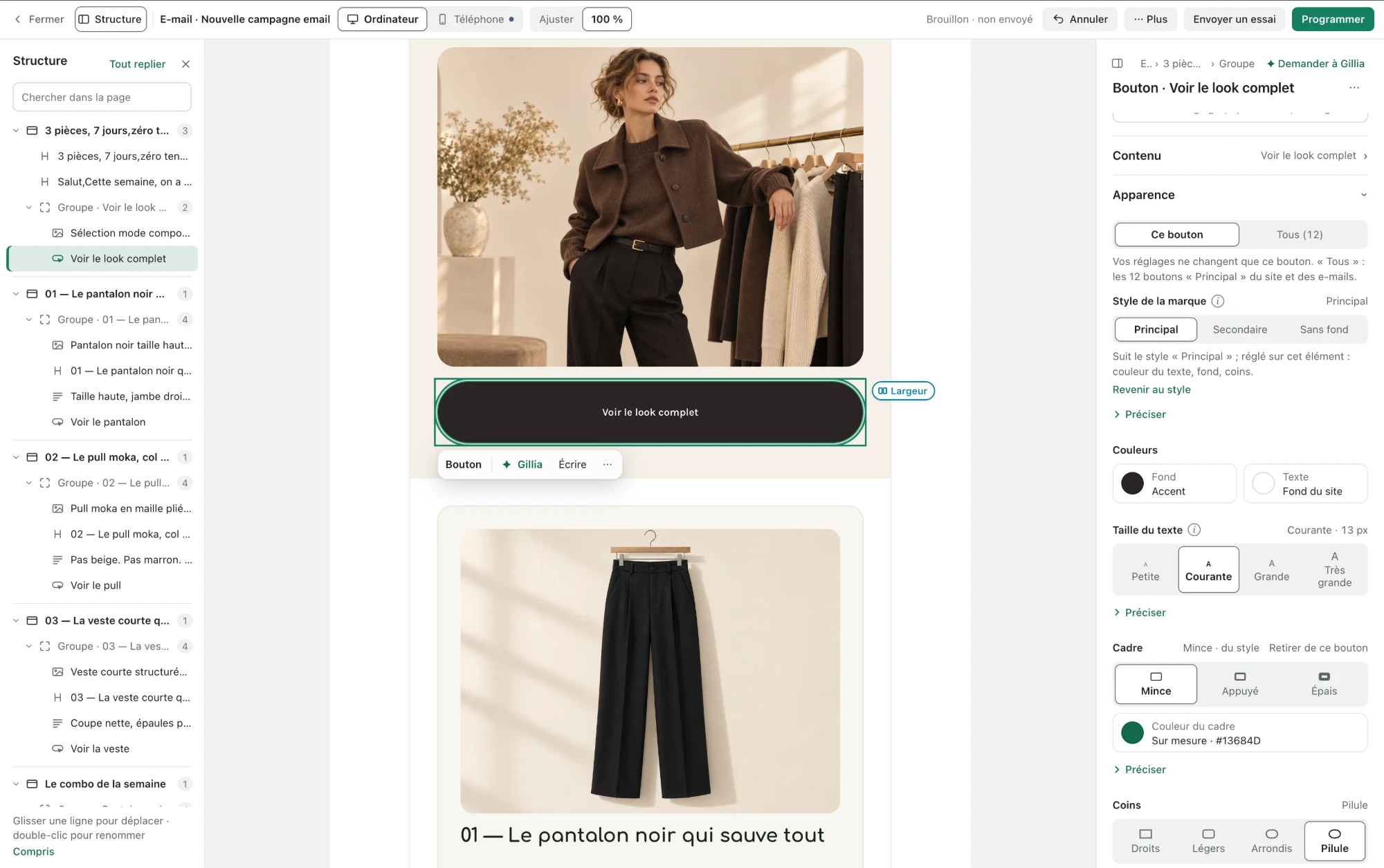
A draft email campaign in the Gillia editor: a selection of three fashion pieces, the campaign structure on the left, the settings of the “See the full look” button on the right, and the Send a test and Schedule buttons

Your numbers

It reads your sales, catalog, customers and inventory to answer your questions.

Your website and online store

Pages, text, images, colors, menu and blog posts are edited as drafts. You see a preview, and nothing goes live without you, unless you’ve allowed it to publish directly.

Your email campaigns

The content, the recipients with an estimated count, a preview, a test send to yourself, the send date. The real send waits for your go-ahead in the conversation.

Quotes, invoices, contracts, delivery notes

Created in a single sentence, with a preview of the document as it prints and of the email as your customer receives it. You can send it to yourself first as a test.

Delivery tracking

Once the document is sent, you know whether it was delivered and opened.

Nothing without your approval

Every change goes through a dry run first, then your confirmation. Everything can be undone for 7 days.

You stay in control

Gillia lists the connected assistants and their calls. You can revoke any connection at any time in Settings › Integrations › Claude & ChatGPT, with the Revoke button.

Included in your AI quota

Calls from Claude or ChatGPT count toward your included AI quota.

Customer data stays hidden

Your customers’ names, emails and phone numbers stay hidden unless you allow it.

One business at a time

You choose which businesses it can access. With several, each request targets one specific business, never all of them at once.

You choose what it can do

When you connect Claude or ChatGPT, you check what the assistant is allowed to do:

  • Always included: sales, catalog, inventory and documents.
  • Your website: read it, prepare changes as drafts and, if you check it, publish them without going through you.
  • Your sends: send your campaigns, quotes, invoices, contracts and delivery notes after your approval in the conversation. Without these boxes, it prepares them and only sends tests to you.
  • Banking and accounting: balances, bank transactions and expense reports, only if you check it.

Going further

A manual key is still available for tools that can’t sign in, such as Claude Code or a script.

Gillia’s know-how

Claude and ChatGPT follow the same procedures as Gillia’s built-in assistant: restocking, unpaid invoice reminders, month-end close, banking, supplier invoices…

5

Make and Zapier

Two new connectors to automate without code.

Make

Automate scenarios between Gillia and your other apps, without code.

Zapier

Connect Gillia to thousands of apps with automated Zaps.

See all Gillia integrations

All of November’s updates are in Gillia

Log in to Gillia
All updates