

Gillia, your AI assistant that takes action
A conversation as your home screen
When you open Gillia, you land on a conversation with it. Your past conversations are listed on the left: you can rename or delete them. Ask a question in plain, everyday language, and Gillia answers with numbers, tables or charts.
Where to find itGillia's home screen.
It takes action, after showing you what it's about to do
Gillia can do the following for you:
- accept, send or follow up on a quote (with a preview of the email)
- record a payment on an invoice, issue a credit note
- start, extend or end a promotion
- duplicate an item or create its variants
- create a customer from just a “First name Last name”
- change your opening hours
Before each action, it shows a confirmation card in plain words. Then it checks that the action actually went through. Most actions can be undone for 7 days.
Build a complete combo meal in one sentence
Set up a lunch special with an appetizer, main and dessert for €15.90
Gillia suggests the whole combo, with its steps, choices, add-ons and the hours it's available. You approve it in one click, and you can undo it just as easily.
Routines: hand off a recurring task
For example:
Every morning, cancel any quotes that have been pending for more than 15 days, notify the customer and let me know.
- Before you turn it on: Gillia shows you what the routine would do today.
- After that: it runs on its own and reports back in the conversation and by email.
- Reports and alerts: same idea for “send me every week…” or “let me know if…”.
Where to find itIn the conversation, and on the “My routines” screen.
Ctrl+K: search or ask, from anywhere
A single field at the top of the screen handles everything:
- go to any screen
- create an item, a customer, a quote or an invoice
- find a record by name, document number or serial number
- ask Gillia a question
Scan a barcode with a handheld scanner: the record opens right away.
Restock from a supplier in one sentence
“Reorder 24 bottles of…” or “place my restock order with [supplier].” Gillia prepares the order line by line and tells you if an order with that supplier is already in progress.
Reports and presentations ready to share
Gillia creates a report or a presentation, with charts and metrics suited to your type of business. You open it as a PDF or PowerPoint, for your business partners or your banker. It can also hand you an Excel, CSV or Word file. Every table in the conversation can be exported to Excel.
“My screen”: your own numbers
Pin any chart or table from the conversation to “My screen” to keep an eye on it every day.
“Show me where to click”
Gillia guides you step by step on screen. It lays out the steps, checks them off as you go and suggests the next one.
Act on a selection
Check items or customers in a list, then say “move these items to the Drinks department.” Gillia shows the before and after, then applies the change.
Guided imports
Attach your Excel or CSV file. Gillia shows a preview, the key figures and a progress bar, with a “Cancel import” button.
Edit your website just by asking
“Edit my home page”: a preview of your website opens next to the conversation. Just ask to change colors, text, buttons or images.
AI-written item descriptions
A “Write / Improve with AI” button writes the item description and its translations. Gillia never makes up allergens, quality labels or origins.
Gillia adapts to you
In “What Gillia knows about me,” you can set:
- its response style: concise, detailed or formal
- your personal instructions
- its thinking level: fast, normal or in-depth
- its trust mode: cautious, standard or autonomous. In autonomous mode, small actions with no money at stake (marking an item as out of stock, hiding a product family) happen without confirmation and can still be undone. Sensitive actions always require your approval.
It also cites its sources when it searches the web, and reads the files you attach (up to 5 per message).
A better-looking, clearer, faster Gillia
A new look and dark mode
The interface has been completely redesigned. Choose light, dark or automatic mode from your account menu. The phone layout has been reworked too: metrics in a grid, cards and tabs.
Redesigned settings
- A single page: 18 sections grouped together, with a location selector.
- One place per setting: each setting carries an “Entire brand” or “This location” badge.
- Notifications section: you choose who receives each internal email.
Account menu and notifications
- Top right: a bell and your avatar give you access to My account, appearance, language and logging out.
- Notifications: they show up about 8 times faster.
- Switching brands: the selector lets you search for a brand and shows its city.
A menu tailored to your business
The menu highlights the sections that matter for your type of business and your goal. The others are still available, just dimmed.
Gillia in English and Spanish
- Screens: each user chooses their own language.
- Emails and PDFs: they go out in the recipient's language.
No more clearing your cache
After an update, a tab left open reloads on its own.
Easier-to-read text
Font sizes have been increased throughout.
Roles: store managers manage their own team
They create their own users and apply a ready-made template: Manager, Sales associate, Order picker or Cashier.
New: After-sales
A new section in the menu, for every business that takes back, repairs or exchanges products.
Customer requests, tracked all the way through
What becomes a tracked “request”:
- an order that never arrived
- a product to take back
- a customer to call back
- a device that's broken
Each request has:
- an owner, a due date and reminders
- internal notes where you can @mention a teammate
- photos and PDFs, so you keep proof of the item's condition at drop-off
Requests are sorted into queues: “Assigned to me,” “Overdue,” “Closed.” An Overview page shows overdue requests and customers who haven't heard back in 2 days.
Where to find itAfter-sales › Customer requests, and the “Requests” tab on the customer record.
Serial numbers: every device has its own history
Each device has its own record, which shows:
- where it is
- who it was sold to
- whether it's still under warranty
- everything that has happened to it
Scan the serial number to open the record. Returns and exchanges put the exact same device back in stock. You can also take inventory by scanning serial numbers.
At the register (Gillia POS): the POS asks for the serial number at the time of sale, by handheld scanner or camera, and the warranty starts at the exact time of the sale.
Where to find itAfter-sales › Serial numbers, and the “Equipment” tab on the customer record.
AI at the service counter
- Prefill: the “Prefill” button suggests the type, the subject and the questions to ask, even from a photo.
- Write: Gillia summarizes the history and writes the message to the customer, in the customer's language.
Known issues: notify every affected customer at once
Group the requests that share the same cause, then write to all the affected customers just once.
Repair cases with the legal warranty calculated
The case follows the device from drop-off until it's back with the customer, including while it's with the supplier. A drop-off receipt is printed. Gillia calculates the French legal warranty.
Product recalls
A supplier is recalling a batch? Gillia blocks the affected stock in all your stores and lists the customers to contact.
Where to find itAfter-sales › Product recalls.
Quotes, invoices and documents
A single page for every quote, delivery note and invoice
- Tracking: a progress tracker shows where the document stands: Draft → Sent → Accepted → Delivered → Invoiced → Paid. At each step, you're offered the right next action.
- Editing: you make changes directly on the document.
More flexible quotes: options, groups, notes
- Replace an item: click a line; the quantity and discount are kept.
- Line notes: add a note under a line, for example “Display model.”
- Optional lines: offer a line as an option, excluded from the total.
- Groups: group lines under headings with a subtotal.
- Special terms: enter your own terms and conditions.
Where to find itOn quotes, orders, contracts and invoices.
Deposits and payment schedules
On an accepted quote, click “Request a deposit,” as a percentage or in euros. The deposit is automatically deducted from the final invoice.
Get the delivery note signed
The customer signs remotely, by email, or in person, on a tablet. The signed PDF is archived.
Deliver from an invoice
A “Deliver” button sits on the invoice, and a “Pending deliveries” list brings together everything that still needs to be delivered.
Customer returns and partial credit notes
Record a return from an invoice, from a receipt or with no document at all. For each line, choose “restocked” or “loss.”
Send and follow up in one click
The quote or invoice email is prefilled. The “Rephrase with Gillia” button rewrites it. The invoice goes out with a “Pay online” button.
Internal notes and reminders on documents
A “Notes” tab on every document lets you mention a colleague, who gets notified under the bell, and set a dated reminder. These notes are never printed.
Subscription contracts signed online
- The contract: monthly or annual, with a minimum commitment period and setup fees.
- Signing: once the contract is signed, the subscription starts and the first invoice is created.
- After that: you can pause, resume, extend or amend it.
- Equipment rental: contracts also let you rent out equipment.
Where to find itCustomers › Subscribers › New contract.
More complete invoices
- Required legal details: your registered company name, SIRET, EU VAT number and APE code appear on your invoices.
- Addresses: a “Ship to” block has been added, and the customer's company is shown with its contact person.
- Online quote signing: it works again, with no errors.
Payments
Get paid online into your own Stripe or Adyen account
Card payments, Apple Pay and Google Pay go straight into your account. They're offered everywhere: online store, invoices, quotes, booking guarantees and your customers' subscriptions. For an order that needs to be shipped, the card is authorized first, then charged when the order ships.
Where to find itSettings › Payments.
Apple Pay and Google Pay on your online store
Express checkout buttons appear on the product page and in the cart.
A single “Payments” section
It brings together your payment accounts, the IBAN printed on your documents, tipping, and a table showing which payment method is offered in which checkout flow.
Online store and kiosk
Your online store in several languages, with one request
Translate my website into English
Gillia translates the pages, the menu and the catalog. A language selector appears for your visitors, and the kiosk offers the same languages.
Combo meals (set menus) now sell online and on the kiosk
- The combo: each step can be configured (minimum and maximum choices, default choice, extra charge). The combo is built on a single page.
- On the kiosk: it asks “…as a combo for €X more?”
- On the kiosk and the online store: “Save €X” is displayed.
AI shopping advisor on your online store (optional)
An AI assistant answers your customers on behalf of your store. It suggests items with an “Add to cart” button and answers questions about your opening hours, pickup and delivery. It never makes up prices or promises.
Where to find itSettings › Online store › Chat and AI advisor.
Sell to businesses
A business customer requests access from your online store. You approve them and assign your business pricing.
Draft pages, then “Publish”
Work on your pages at your own pace, then publish when they're ready. Your online store is also faster and ranks better on Google.
Thoughtful touches
- Icon: your store's logo appears in the browser tab and on your customers' phones.
- Search: it's clearer, with one suggestion per item.
- Forms: they're protected against bots, with no CAPTCHA.
Point of sale (Gillia POS)
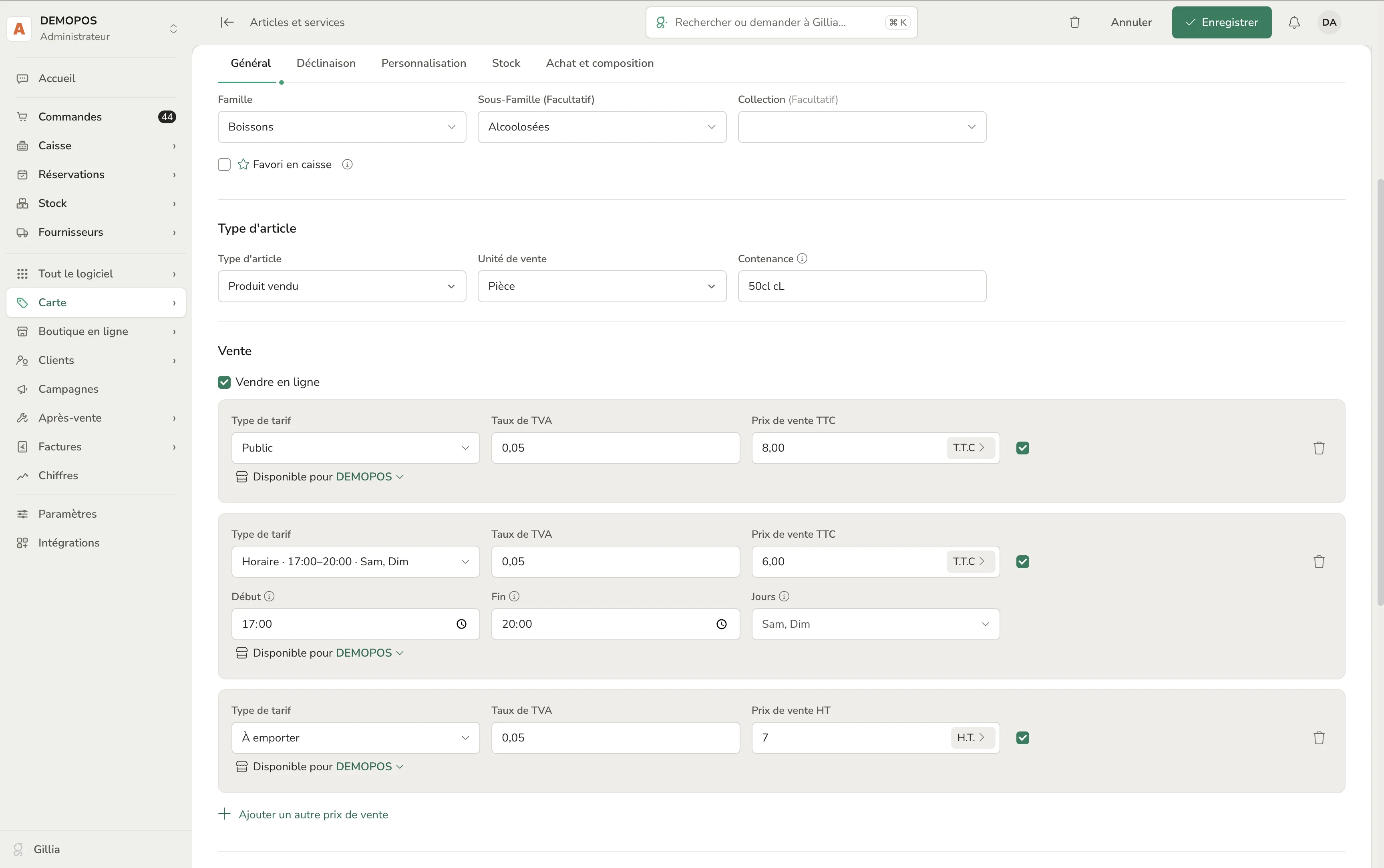
Happy hour pricing and lunch specials
An item can have a price that changes by time and day: happy hour from 5 p.m. to 7 p.m., a lunch special, a late-night surcharge…
Where it applies: on the POS and on the kiosk.
Where to find itItem record › Sales › “Time-based” price.
Favorite items
Check “POS favorite”: the item appears in the “Favorites” tab at the top of the POS. The kiosk shows an “Our top picks” category.
Tipping in one tap
A “Tip” button suggests your percentages with their amounts, or a custom amount.
POS operators managed from Gillia
Create your operators, turn them on or off, and change their 4-digit code from your office.
POS devices
A page lists your registers, kiosks and tablets by location, with a “Remove” button.
Simpler first login
The POS signs in through Gillia and picks the right location on its own.
Gillia POS on Windows PCs
The POS installs on a PC and updates itself, never in the middle of a sale.
Payment links you can track
Send a payment link by email or QR code, then track it, send a reminder or cancel it.
POS in English and Spanish
The screen language can be different for the seller and for the customer.
Reliability
- Payments: no more double charges or lost payments.
- Exchanges: they come through as a credit note linked to the original receipt.
- Loyalty: points redeemed at the POS are correctly deducted.
- Images: item images now update properly.
Inventory and purchasing
“Pending” supplier orders
They have their own tab. The PDF and email only go out when you send the order.
Calculated restocking
It factors in target stock, available stock, quantities on order, case packs and supplier minimums.
Reserved stock
An accepted quote reserves the goods. You see “Available: X (incl. Y reserved).”
Stock alerts
Expiration dates coming up or passed (“Write off”) and items below their minimum (“Order”).
Supplier purchase terms
Tiered pricing by quantity, “Buy N, get M free,” free shipping thresholds.
Supplier returns
Straight from a received delivery.
Stock removal and transfer slips
Proper documents.
Pricing by package size
Small package sizes are priced correctly (a 10 ml bottle is no longer counted per liter).
Safer imports
A preview before you import an inventory count or items, with automatic format detection.
Supplier invoices read by AI
More reliable, with drag-and-drop upload for the supporting document.
Sharing with a quality assurance provider
Give them access to your receiving records (quantities, batches, expiration dates), without any prices.
Customers and data
Personal data (GDPR) in two clicks
- Export: generates a customer's “right of access” document.
- Erase their data: anonymizes the customer record while keeping your accounting documents.
Where to find itCustomers › row ⋮ menu › Personal data (GDPR).
Get all your data back, anytime
A ZIP archive contains your invoices as PDFs, your accounting entries (FEC), your Z reports, your receipts, your customers and your items.
Where to find itSettings › Gillia subscription › All your data.
Local time for French overseas territories
Invoices, receipts, reminders and dashboards show your store's local time, in Réunion, the French Caribbean…
For store networks: “My Franchise”
This section only applies to network head offices (franchisors, cooperatives, chains of company-owned branches) and their stores.
The network feed
- head office posts guidelines, campaigns and announcements
- stores ask their questions
- a “To do” banner brings everything together
- the feed is also available in the mobile app
Central purchasing
Stores order just like on an e-commerce site, with an order prefilled based on their sales. The supplier confirms by email, without creating an account.
The brand catalog
Head office publishes its items with a suggested retail price, and stores add them in one click.
Royalties calculated automatically
A statement for each store, then an invoice.
Brand-wide loyalty
- a single card, valid in every store
- the card appears on the online store and in Apple Wallet or Google Wallet
The network exchange
A store offers nearby stores a batch that's close to its expiration date, or asks for help when it runs short.
Performance
Head office sees how well launches are being adopted and where the gaps are. Each store anonymously compares itself to the network.
Network agreement
Head office prepares the new version, and each store sees what's changing before accepting it.